Consistent AI characters with Higgsfield Soul: a practical guide
The same face in every shot is what turns random AI images into a series, a brand mascot or a story. Here is how to achieve character consistency on Higgsfield, from simple prompt tricks to trained characters.
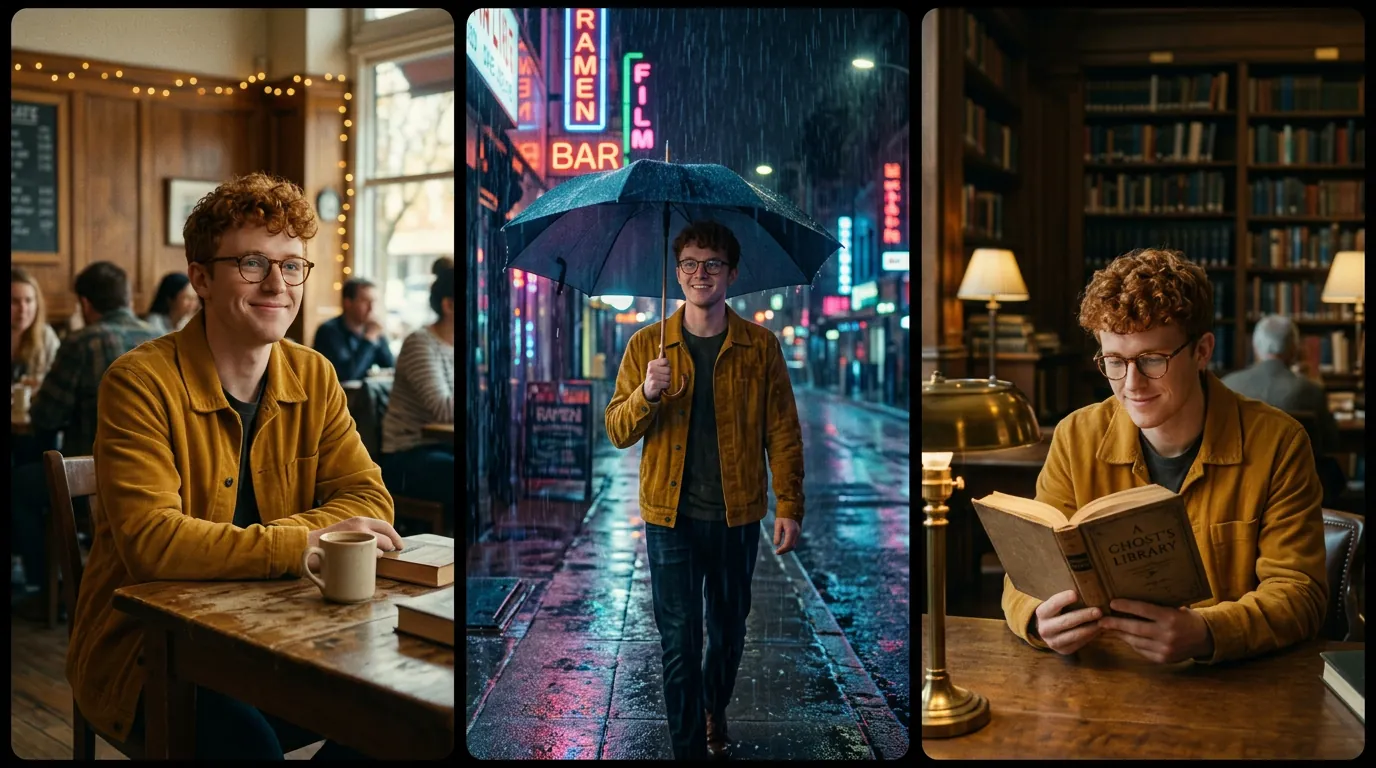
- Level 1 — Prompt: an identical, detailed character description in every prompt.
- Level 2 — Reference: reuse one approved image of the character as a reference.
- Level 3 — Trained character: train a reusable Soul character from a set of photos.
Why consistency is hard
Each generation starts from random noise. Even with the same prompt, a model will invent a slightly different face, hairstyle or outfit every time. For a single image that does not matter; for a series, an ad campaign or a short film, it breaks the illusion. Higgsfield tackles this with its Soul family of models and dedicated character features.
The Soul family in brief
| Model / feature | What it is for |
|---|---|
| Soul 2.0 | Realistic people, fashion editorial and UGC-style images. |
| Soul Cast | A consistent cinematic character identity from a description. |
| Soul ID (trained character) | A reusable character trained from your own set of photos. |
| Soul Location | Consistent environments and locations to pair with your characters. |
Names reflect the catalogue we checked on October 29, 2026.
Level 1 — The character card
Write a short “character card” and paste it, word for word, into every prompt. Include: age range, hair, eyes, one distinctive accessory, a signature outfit and a colour.
a young man with short curly red hair, round tortoiseshell glasses and a mustard yellow jacket
Then vary only the scene. The three-panel image above used a single prompt that asked for “identical face and outfit in every panel” — a quick way to test whether a model holds a character together.
Level 2 — Reference images
- Generate until you love one faceThis becomes your “hero” reference.
- Use it as a reference in every new generationMany image models on Higgsfield accept reference images; describe the new scene and keep the character card.
- For video, use it as the start frameThe character’s look is then fixed in the first frame of every clip.
Level 3 — Train a reusable Soul character
For recurring presenters, mascots or brand ambassadors, Higgsfield lets you train a character from a set of photos (the interface tells you how many it needs; at the time of writing, a few to around twenty). Training takes several minutes, after which you can select the character by name in compatible generations.
- Use sharp, well-lit photos with varied angles and expressions.
- Avoid sunglasses, heavy filters and group photos.
- Keep the same hairstyle in all photos if you want it to stay consistent.
Common mistakes
- Changing the description between prompts (“red hair” then “ginger hair”).
- Too many characters per image — models mix features. Keep to one or two.
- Extreme angles or tiny faces — identity is harder to keep in very wide shots.
- Switching models mid-project — each model draws faces differently.
Frequently asked questions
Is Soul ID the same as a face swap?
No. A face swap pastes a face onto an existing image or video. A trained character lets the model generate new images of that person from scratch, in any scene.
Can I use the same character in videos?
Yes. Generate consistent stills, then use them as start frames for image-to-video, or use video models that accept character references.
How many photos do I need to train a character?
The required number is shown in the training interface and may change. More varied, high-quality photos generally give better results.
Facts checked: October 29, 2026. Features, models and plans change often — always confirm on the official site.
Keep learning
What is Higgsfield AI? A clear introduction for 2026
Higgsfield AI explained in plain language: what the platform does, its main studios and models, who it is for, how credits work and how to get started.
Read guide →
Higgsfield for beginners: your first hour, step by step
A step-by-step Higgsfield tutorial for beginners: create your account, understand the interface and credits, generate your first image and turn it into a video.
Read guide →
How to plan and make your first AI video with Higgsfield
A practical workflow to make a short AI video with Higgsfield: write a one-line idea, build a shot list, create key frames, animate them, add sound and edit.
Read guide →